
The next Beta test version of Expert Controller Plus is V0.8.0 and it contains new features, some usability improvements and a bug fix to its database/persistent storage.
The User Guide has been updated to incorporate the changes identified in this post.
As the Beta test phase is near conclusion, future updates may contain bug fixes and, perhaps, some minor usability improvements only. V0.8.0 is now, essentially, what will become V1.0.0 in August 2026. Thanks to everyone who has provided feedback over the last few months.
New Features
Power combiner support
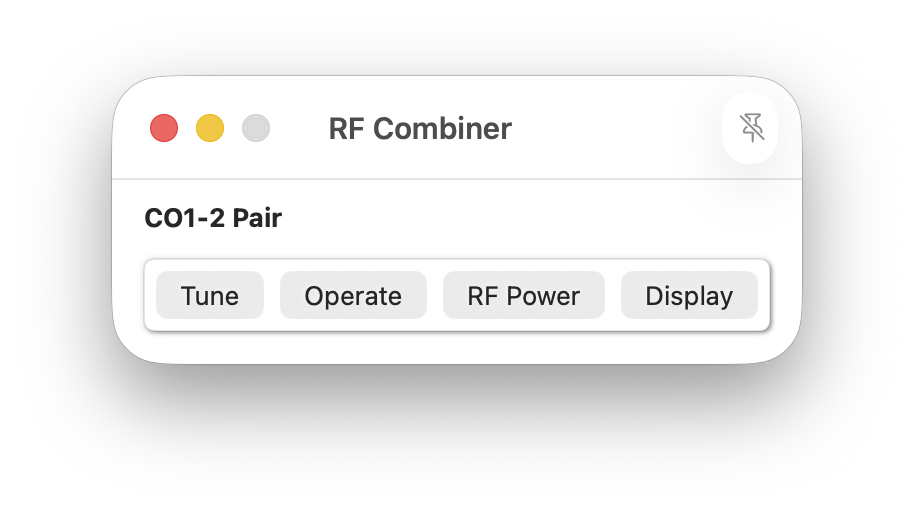
Expert Controller Plus now supports the pairing amplifiers for use with an RF power combiner such as the SPE CO1-2. This has been achieved by extending the existing Groups feature to enable specification as an ‘RF Combiner’ group.
When a group is configured as an ‘RF Combiner’, Expert Controller Plus opens a new window that enables the following functions to be performed simultaneously: Tune, Operate/Standby, RF Power selection and Display.
Expert 1K-Taurus support
The recently announced Expert 1K-Taurus has been added to the list of supported amplifiers. It will be listed as an option automatically when Expert Controller is first installed or the ‘Restore amplifiers’ button is selected (Settings… | Amplifiers menu option)
Improvements
The following improvements have been incorporated:
- Many Expert amplifiers contain a single PA heat-sink. The temperature gauges presented in the Expert Controller Plus Gauges window can now be selected when defining an Amplifier.
- When defining an amplifier the number of RF power bands can now be selected. e.g. Low, Mid, Max or Half/Full. This tidies the amplifier settings window by removing unused properties.
- The amplifier-view windows have been moved from the ‘File | New’ menu option to just the ‘File’ option to improve discoverability and ease of use.
Bug Fixes
- A possible corruption in the database / persistent storage has been identified and is thought to impact only those using older Beta test versions. If present, this is identified by Expert Controller Plus when started. Unfortunately the most reliable fix is to restore the database to a fresh install state, thus loosing all existing configuration. If this is necessary, a pop-up message informs the user.
- When a setting such as amplifier name was changed, it did not always immediately update elsewhere in Expert Controller Plus. This has now been resolved.
Andy