Tag Archives: Expert Controller

SPE Expert Controller – macOS 26 Beta 9

As a test, this morning I’ve been running SPE Expert Controller version 1.2.2, on the latest developer release of macOS 26 Beta 9 and I’m happy to report that it still appears to run just fine with no issues just as it did on Beta 2.

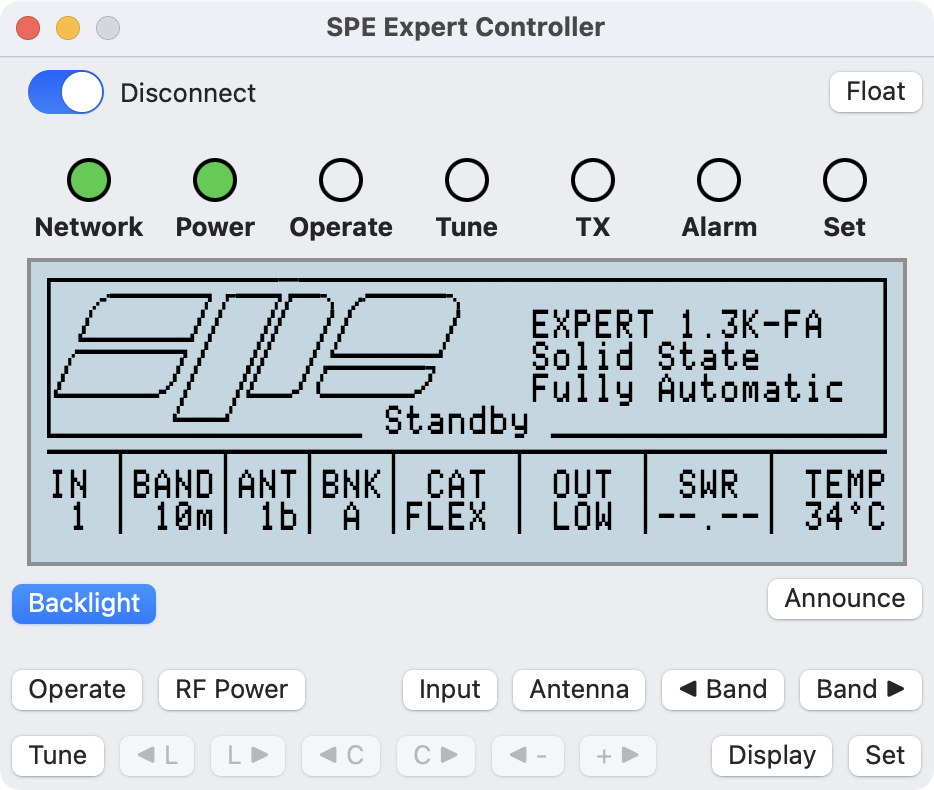
SPE Expert Controller v1.2.2, macOS26 Beta 9

Testing was on a virtual Mac machine, as oppsed to real physical Mac, connected to my amplifier using a network connection and Waveshare adapter. But everything including Voiceover worked just fine.

SPE Expert Controller continues to look just the same as it does on macOS 15 with the minor irritation that the application icon in the Dock is enclosed inside a grey box. But, hey, that’s Apple’s way of telling users an App hasn’t been updated for Liquid Glass.

Once Apple have done the full public release macOS 26 my intention is still to update SPE Expert Controller to incorporate Liquid Glass whilst retaining backward compatibility with macOS 14 and 15. I’m not yet clear how a redesigned icon for macOS 26 will look on earlier macOS versions but, I guess, I’ll find out soon enough. Thanks Apple!

Andy

Expert Controller – The future

Quite often I receive an enquiry asking one of three questions:

  • Does SPE Expert Controller support multiple simultaneous amplifier connections?
  • Is an IOS / iPadOS version available?
  • Is the 1k-fa supported?

For the current version of SPE Expert Controller these are all answered in the FAQ, Support section of this website. However, I thought I’d give an update on recent developments.

I’ve started to develop what will, I hope, address the first bullet and ultimately result in an App that would have a similar look on both iPadOS and macOS. Right now, it’s very early in the development process and, if successful, will likely result in a new macOS version followed by an iPadOS App. This work will occur in parallel so the existing SPE Expert Controller App will continue to receive updates, the next one of which will be to add Liquid Glass support later this year after the official public release of macOS 26.

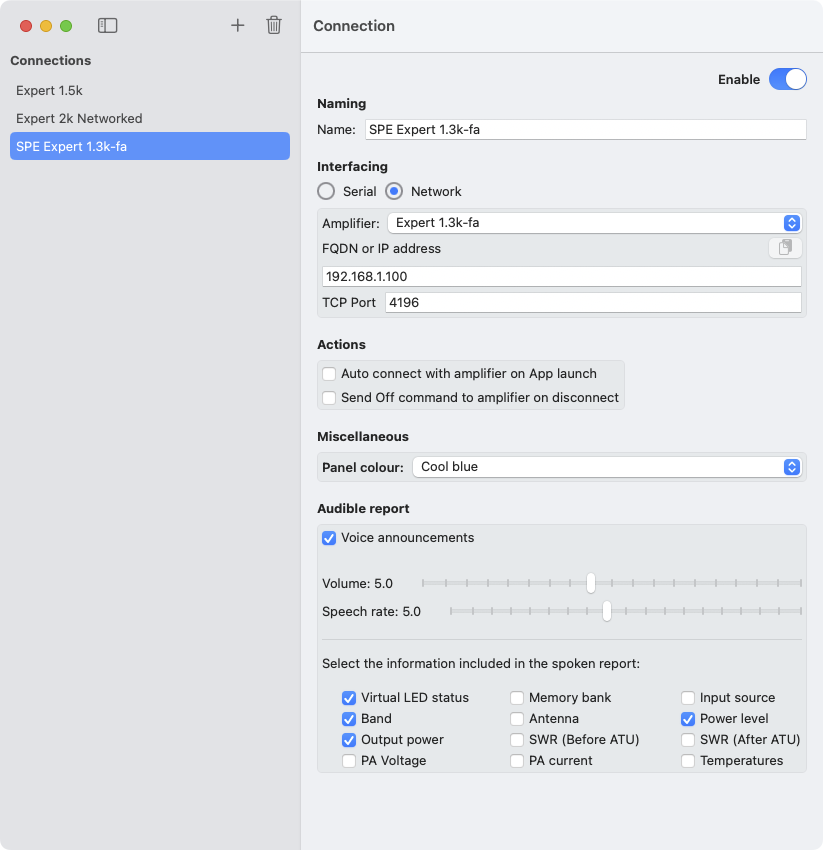
The new SPE Expert Controller will allow the creation of multiple ‘connections’ each of which could use a USB or TCP/IP interface. The vision is that these ‘connections’ will operate independently of each other and look similar to how SPE Expert Controller does today. So, a menu selection like File | Open | New connection would open a window permitting a new connection to be established. These windows would have the amplifier LCD panel display and the usual buttons to switch between Standby/Operate, Set mode etc.

Connections
Connections

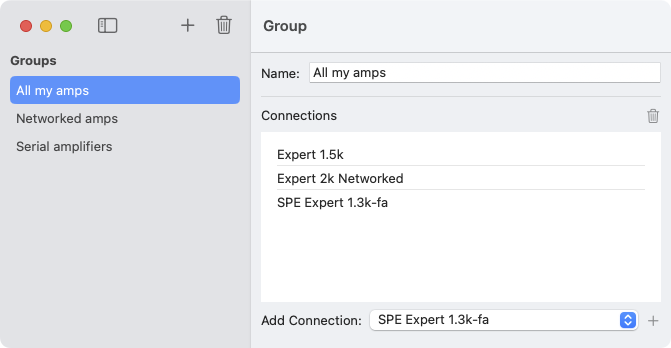
Additionally, the App will include a ‘group’ concept that would allow ‘connections’ to be grouped and actions on a selected group to be performed. These groups could relate to any concept we wish so, ‘Local amplifiers’, ‘Remote amplifiers’ or ‘Serially interfaced amplifiers’ etc.

Groups
Groups

The sharp-eyed reader will also note that the ‘Interfacing’ section of the Connections window contains a new ‘Amplifier’ field. This provides a capability for a Connection to relate to a specific model of SPE amplifier; a useful ability should SPE implement different management interface protocols in future. And as I’m sure some readers are already thinking….what about the 1k-fa? Well it does provide a means to support that amplifier too. That’s not to say it will, but it certainly could…..

It’s not certain yet whether this new version of SPE Expert Controller will come to fruition as there is a lot of work outstanding and a number of technical difficulties to overcome. I’ll continue to provide updates here when there is something significant to report.

Andy

SPE Expert Controller – V1.2.2

This morning I have published the revised User Guide and Release Notes for V1.2.2 in readiness for its release. V1.2.2 is currently in the Apple Appstore review process and once complete will roll-out to all users over the following seven days.

V1.2.2 of SPE Expert Controller is a minor update. It now correctly identifies the 1.5k-Taurus amplifier in the Health window and clarifies SWR measurement field labels in the RF Information window. The clarification removes any ambiguity that arose as to which SWR sensor the fields represented. This latter change has also been reflected in the vocalised audible report.

Andy

SPE Expert Controller – Update

The latest release of SPE Expert Controller (V1.2.1), and all earlier versions, work with the 1.5k-Taurus amplifier model. However, recent comms with SPE regarding specification missing from their Application Programmers Guide has identified that SPE Expert Controller isn’t identifying the Taurus model in its ‘Health information’ window. So instead of titling the window “SPE Expert 1.5k-Taurus Health” it will simply be titled “Health”. The upper value (Watts) for the “RF Power” bar-graph in the ‘RF Information’ window will be 2500 Watts and not scale according to the power level (High, Medium, Low) selected. I’ve updated the software so this will be fixed in the next release.

The next release will also include minor changes to the labelling of the SWR fields in the ‘RF Information’ window so it’s clearer to which SWR sensors within an SPE Expert amplifier they relate. The new labels will be “SWR (Before ATU)” and “SWR (After ATU)”. The spoken, audible report and associated ‘Settings | Announcements’ window fields have also been updated to align with this change.

The release of SPE Expert Controller version 1.2.1 has been successful and no issues have been reported. My plan was that the next release (V1.3.0) would be an update containing UI changes for macOS 26 (Tahoe) but I’m thinking in the interim I’ll push a version 1.2.2 containing the above changes.

Andy

SPE Expert Controller V1.2.1 – Released

Earlier today the latest version of SPE Expert Controller for macOS cleared the Apple App Store review process and is now available from the macOS App Store.

It will become available to all existing users over the next seven days or immedietly for new users and those who initiate a manual update via the App store.

This release includes several minor improvements to UI operation and some bug-fixes. Although update isn’t essential I’d recommend updating to this version especially if you are using a version prior to v1.2.0.

The User guides and Release note sections of this website have been updated so, those curious to see what’s changed can do so in advance of updating. See the Support section.

Andy

SPE Expert Controller – Release update

Since my last post I’ve been regression testing SPE Expert Controller and testing the changes introduced in this version. Doing this identified that whilst the App was connected to an amplifier it was not automatically switching between Light and Dark modes when informed by macOS that a change should occur.

Resolving this simple issue led to a major change in the code behind the facsimile of an amplifier front-panel LCD display. The result is that the main App window is less wide and a little less tall; otherwise it’s pretty much the same. The ‘Announce’ button was also moved to accommodate the reduced window width. I’m pleased, the result is sharper and the font looks less like it’s from the 1980’s! It also now seamlessly switches between Dark and Light modes when informed by macOS.

Complementing the previous colour schemes are now a further two: Green black and White black. Green text on a black background (as Dark mode) and White text on a black background.

I’ve also resolved a couple of other minor defects which had gone unnoticed in earlier versions. Below is the current list of addition/changes. Testing will continue over the next few weeks but the latest build is looking stable so I’m not expecting to find anything major but there may be a few small tweaks yet…

Additions/Changes

  1. The third-party Network/Serial adapter may now be identified using a FQDN (Fully Qualified Domain Name) in addition to an IP address.
  2. Removed ‘Save’ button from the Settings window. Settings now auto-save when choosing an alternate tab or the window is closed.
  3. Enabled the ‘Edit’ menu bar option to better support cut/copy/paste operations.
  4. Added ‘News’ and ‘Support’ to Help menu. These open corresponding pages on the SPE Expert Controller website.
  5. Resolved issue whereby the Settings | Comms tabview did not re-enable the change of information after closing the connection to an amplifier.
  6. The visualisation of an Amplifier’s front-panel LCD changed to resolve an issue switching between Apple Light/Dark modes and to improve sharpness of visualisation.
  7. The colour of the RF Power, PA Voltage and PA Current gauges on the RF Information window are now Green, Yellow and Blue respectively.
  8. Fixed issue whereby the incrementing dots of the Communications interrupted message did not always restart from a single dot after a Disconnect/Connect cycle.
  9. SWR ANT and SWR ATU values swapped to align with observed usage rather than that detailed in the SPE Application Programmer’s Guide. This change impacts the RF Information window and the spoken report.
  10. Two new colours – ‘Green Black’ and White Black’ added to Settings | General | Background colour.
  11. Minor update to underlying datastore. The datastore is automatically updated when version 1.2.1 is first run. The updated store is not compatible with earlier versions.
  12. Miscellaneous minor improvements to internals of the App.

Andy

SPE Expert Controller – Next release update

Over the last few days I’ve been implementing some minor changes to SPE Expert Controller, resolving a minor defect and updating the documentation in readiness for public release in the coming weeks.

This release candidate is now being tested and if all goes well I’m hoping to make it available during late July as version 1.2.1.

Below is a list of Additions/changes as they stand today.

  1. The third-party Network/Serial adapter may now be identified using a FQDN (Fully Qualified Domain Name) in addition to an IP address.
  2. Removed ‘Save’ button from the Settings window. Settings now auto-save when choosing an alternate tab or the window is closed.
  3. Enabled the ‘Edit’ menu bar option to better support cut/copy/paste operations.
  4. Added ‘News’ and ‘Support’ to Help menu. These open corresponding pages on the SPE Expert Controller website.
  5. Resolved issue whereby the Settings | Comms tabview did not re-enable the change of information after closing connection to an amplifier.
  6. The colour of the RF Power, PA Voltage and PA Current gauges on the RF Information window are now Green, Yellow and Blue respectively.
  7. SWR ANT and SWR ATU values swapped to align with observed usage rather than that detailed in the SPE Application Programmer’s Guide. This change impacts the RF Information window and the spoken report.
  8. Minor update to underlying datastore. The datastore is automatically updated when version 1.2.1 is first run. The updated store is not compatible with earlier versions.

Once ready it will be released to the Apple Appstore. Those who have configured their Mac to auto-update will receive the update automatically! Other’s will have to update using their App Store App.

If you have any questions/comments, please drop me a mail via this website.

Andy

SPE Expert Controller – DNS Support

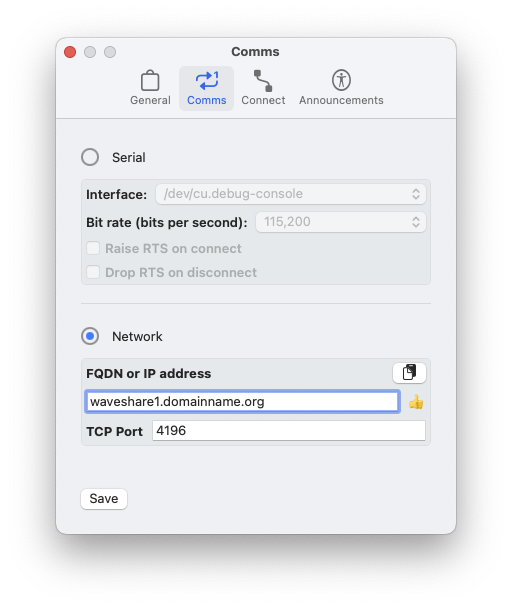
I’ve been adding support for a network/serial adapter to be identified by a Fully Qualified Domain Name or DNS name in addition to its IP address to SPE Expert Controller today.

Using a name makes identification more human friendly; we remember names more easily than IP addresses, especially IPv6 addresses! Perhaps more importantly tho, using a DNS name adds support for deployments where an amplifier / network/serial adapter is deployed in a system using dynamic DNS.

Whilst making changes I’ve also added a Paste button, allowing the endpoint field to be completed using clipboard content. This is most helpful when using an IPv6 address or a long DNS name. Those with a keen eye will also spot the little ‘hand’ graphic; It is thumb-up for valid information and thumb-down when invalid.

As of yet there is no release date for the next version. If you have feature requests please get in touch using the Contact form on this website.

Andy

macOS Tahoe 26.0 and SPE Expert Controller

This week was WWDC 25, the annual Apple developer conference were Apple announce’s their next software. This year, one of the many announcements was a UI redesign which they called ‘Liquid Glass’. It will provide a common ‘look and feel’ across their hardware including the Mac. It looks a little different to recent versions of macOS such as Sonoma and Sequoia with visual effects to provide improved separation between UI controls and content.

The good news is that Apps built for earlier macOS versions will continue look just the same on Tahoe. However, that backwards support will be dropped from whatever follows Tahoe. But that’s not something to worry about for a while.

The other thing to note is that Tahoe will be the last version of macOS that will support Intel processors. So, if you are using an Intel Mac and wish to use whatever macOS follows Tahoe then you are going to need new hardware.

Out of curiosity to take an early peek I downloaded the first developer beta and installed SPE Expert Controller v1.2.0. Sure enough, just as Apple said, it looks and works just the same as it does on Sequoia. That’s pretty reassuring and is an early indication that it should work just fine even if it were not updated.

However, my thinking is that I’ll rebuild SPE Expert Controller for Tahoe later this summer so that a Liquid Glass version is available for the public release of Tahoe, presumably around September / October 2025.

Andy