
Tag Archives: Announcements

Announcements about new releases and features

Expert Controller Plus – Update 15

Expert Controller Plus

In the latest Alpha test release of Expert Controller Plus (v0.4.0-620) there is now a window for each amplifier Connection that presents the forward RF Power, PA Volts, PA Amps and temperatures as reported by an Expert amplifier. The window is available from the ‘New’, top-level menu.

Expert Controller Plus - Gauges (Expert 2k-fa)
Expert Controller Plus – Gauges (Expert 2k-fa)

The new Gauges window is also available for the Expert 1k-fa amplifier. As it reports only a single temperature, only one temperature gauge is shown.

Expert Controller Plus - Gauges (Expert 1k-fa)
Expert Controller Plus – Gauges (Expert 1k-fa)

Another small change, but one that saves a little screen/display real-estate, is the removal of the text ‘Connection:’, a divider and a little white-space from all windows that allow selection of a Connection. The new design for these windows is reflected in the Gauges windows above.

This update is available through the ‘Check for updates…’ capability added in the previous release or as a new download from the downloads page.

I’m seeking testers, with any Expert amplifier but especially an Expert 1k-fa so, If you would like to get involved with testing and provide feedback please drop me a message using the Contact page on this website.

Further information about Expert Controller Plus including how to download the software can be found in the Software and Support sections of this website.

What’s the difference between Expert Controller and Expert Controller Plus? Click here to read about the key differences.

Expert Controller Plus – Update 14

Expert Controller Plus

Expert Controller Plus v0.3.0-612 includes the ability to check for updates using the new ‘Check for Updates…’ menu-bar option. On its selection, the App checks to see if a newer version is available and if identified, downloads the update and starts the installation process. Installation requires user authorisation which must be granted for it to complete.

Check for Updates...
Check for Updates…

Additionally, the new update function also supports automatic checks for a later version and the ability to automatically download and install updates. The image below presents an example of a window notifying that an update is available.

Check for Updates - A new version is available
Check for Updates – A new version is available

Also included in this update are improvements to Apple Voiceover descriptions for Stepper aka Spinner controls. These are predominately used in Connection settings but are also in the Application settings.

The previous version introduced keyboard shortcuts for the top-level menu, View | Announcements, Activation | Groups and Activation | Connections options. These keyboard shortcuts have been changed in this version to the following: Shift+Command+A, Shift+Command+G, Shift+Command+C.

I’m seeking testers, with any Expert amplifier but especially an Expert 1k-fa so, If you would like to get involved with testing and provide feedback please drop me a message using the Contact page on this website.

Further information about Expert Controller Plus including how to download the software can be found in the Software and Support sections of this website.

What’s the difference between Expert Controller and Expert Controller Plus? Click here to read about the key differences.

Andy

Expert Controller Plus – Update 13

Expert Controller Plus

Today it’s the end of January 2026 and I’m making available Expert Controller Plus, Version 0.2.3, Build 566 for Alpha testing. It contains the following changes.

  • Keyboard shortcuts have been added to top-level menu options: Announcements, Activate | Groups and Activate | Connections
  • The Apple Voiceover labels and hints for buttons have been reviewed and updated.
  • Apple Voiceover now identifies keyboard shortcuts were they exist on buttons.
  • Four Keyboard shortcuts have been added to buttons in the Activate | Groups and Activate | Connections windows:
    • Start – Command-S
    • Stop – Command-T
    • Wake – Command-W
    • Sleep – Command-P

I’m looking for testers, especially for the Expert 1k-fa so, If you would like to get involved with testing and provide feedback please drop me a message using the Contact page on this website.

Further information about Expert Controller Plus including how to download the software can be found in the Software and Support sections of this website.

What’s the difference between Expert Controller and Expert Controller Plus? Click here to read about the key differences.

Expert Controller version 1.3.0

Expert Controller

Version 1.3.0 of Expert Controller will be available in the Apple App Store in early January 2026. If your Mac is configured to download and install updates, no further actions will be necessary. For others, please visit the Updates section of the App Store, select the App and download to install. The update does not change any existing Settings so all will be retained, unchanged.

System requirements for Version 1.3.0 remain unchanged from earlier versions. So, an Apple Mac running either macOS 14, 15 or 26 and an SPE Expert 1.3k-FA or later amplifier.

Version 1.3.0 contains cosmetic changes so that its windows look great on macOS 26 and earlier versions along with some minor improvements to Accessibility and some bug fixes. It has a new icon which conforms to macOS 26 sizing requirements and whose design is common between Expert Controller and Expert Controller Plus.

What’s the difference between Expert Controller and Expert Controller Plus?

Click here to read about the key differences

The list below summarises the changes in Expert Controller 1.3.0:

  • Iconography updated for macOS 26 and to align with that used by Expert Controller Plus.
  • The font used in the LCD window has been updated to resolve an issue with all bar-graphs not displaying their final character correctly.
  • The Backlight button has been replaced with two buttons that use a bulb icon. These icon buttons have been relocated to the lower-right side of the Controller window.
  • The Float button has been replaced with a new button using a Pin icon and relocated to the Title-bar of the Controller window.
  • The visual appearance of the Controller window has been updated to improve alignment with macOS 26 and earlier versions.
  • Buttons on the Controller window have been re-grouped to improve usability and align with the layout used by Expert Controller Plus.
  • The light and dark mode graphics of a stylised amplifier shown in the LCD panel when disconnected have been updated.
  • The application has been renamed ‘Expert Controller’ to align more clearly with the naming scheme used by the plus version – ‘Expert Controller Plus’.
  • To improve Accessibility, some buttons have either been relabelled or new Accessibility labels applied.
  • The ordering of items in the Announce / spoken-report has been adjusted.
  • The embedded User Guide and Release Note documents have been removed and replaced with links to https://g0rvm.uk from where the documents may be downloaded.

Below is a image presenting the updated Controller window on macOS 26.

Expert Controller v1.3.0

Andy

Expert Controller Plus – Update 12

Expert Controller Plus

Today I’m making available Expert Controller Plus, Version 0.2.2, Build 539 available for Alpha testing. It contains the following minor fixes.

  • A Connection cannot now be Disabled using the Settings | Connection window if it is in use.
  • The Amplifier selection may not be changed whilst its associated Connection is in use.
  • The references to web pages ‘News’ and ‘Support’ under the Help menu have been updated.
  • The Welcome window link to Support information at g0rvm.uk updated.

I’m looking for more testers, especially for the Expert 1k-fa so, If you would like to get involved with testing and provide feedback please drop me a message using the Contact page on this website.

Further information about Expert Controller Plus including how to download the software can be found in the Software and Support sections of this website.

What’s the difference between Expert Controller and Expert Controller Plus? Click here to read about the key differences.

Expert Controller Plus – Update 11

Expert Controller Plus

Today I’m happy to announce that I’m making the first, Alpha test, version of Expert Controller Plus available for download.

If you would like to get involved with testing and provide feedback please drop me a message using the Contact page on this website.

Further information about Expert Controller Plus including how to download the software can be found in the Software and Support sections of this website.

What’s the difference between Expert Controller and Expert Controller Plus? Click here to read about the key differences.
Expert Controller – macOS 26 Beta 9

Expert Controller

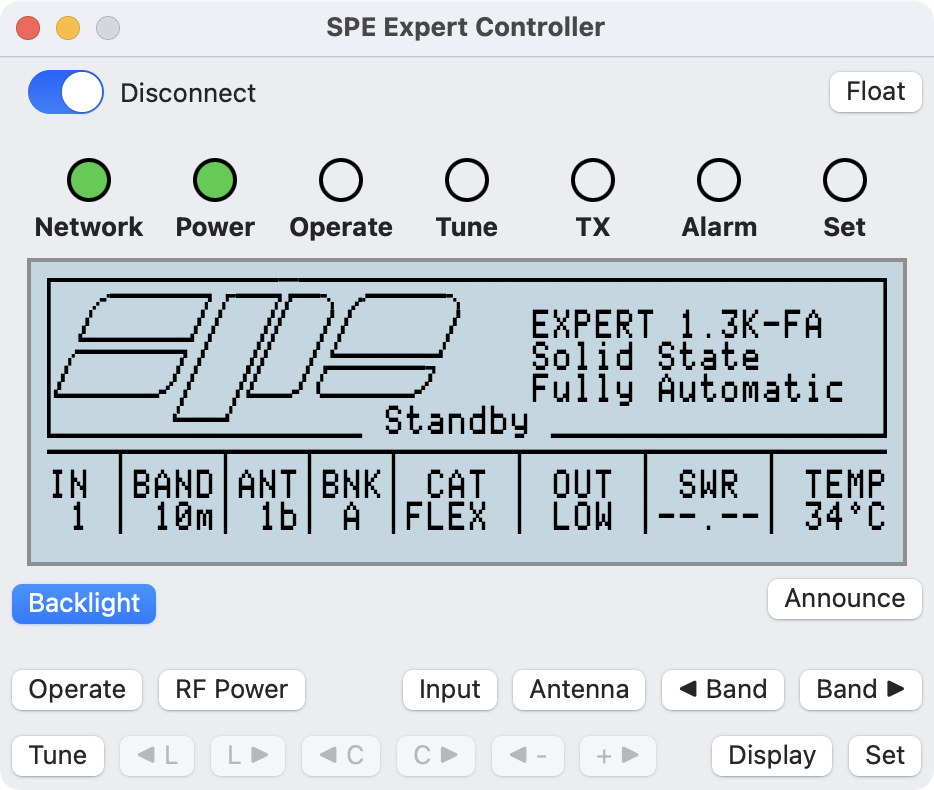
As a test, this morning I’ve been running SPE Expert Controller version 1.2.2, on the latest developer release of macOS 26 Beta 9 and I’m happy to report that it still appears to run just fine with no issues just as it did on Beta 2.

SPE Expert Controller v1.2.2, macOS26 Beta 9

Testing was on a virtual Mac machine, as oppsed to real physical Mac, connected to my amplifier using a network connection and Waveshare adapter. But everything including Voiceover worked just fine.

Expert Controller continues to look just the same as it does on macOS 15 with the minor irritation that the application icon in the Dock is enclosed inside a grey box. But, hey, that’s Apple’s way of telling users an App hasn’t been updated for Liquid Glass.

Once Apple have done the full public release macOS 26 my intention is still to update Expert Controller to incorporate Liquid Glass whilst retaining backward compatibility with macOS 14 and 15. I’m not yet clear how a redesigned icon for macOS 26 will look on earlier macOS versions but, I guess, I’ll find out soon enough. Thanks Apple!

Andy

SPE Expert Controller – Release update

Since my last post I’ve been regression testing SPE Expert Controller and testing the changes introduced in this version. Doing this identified that whilst the App was connected to an amplifier it was not automatically switching between Light and Dark modes when informed by macOS that a change should occur.

Resolving this simple issue led to a major change in the code behind the facsimile of an amplifier front-panel LCD display. The result is that the main App window is less wide and a little less tall; otherwise it’s pretty much the same. The ‘Announce’ button was also moved to accommodate the reduced window width. I’m pleased, the result is sharper and the font looks less like it’s from the 1980’s! It also now seamlessly switches between Dark and Light modes when informed by macOS.

Complementing the previous colour schemes are now a further two: Green black and White black. Green text on a black background (as Dark mode) and White text on a black background.

I’ve also resolved a couple of other minor defects which had gone unnoticed in earlier versions. Below is the current list of addition/changes. Testing will continue over the next few weeks but the latest build is looking stable so I’m not expecting to find anything major but there may be a few small tweaks yet…

Additions/Changes

  1. The third-party Network/Serial adapter may now be identified using a FQDN (Fully Qualified Domain Name) in addition to an IP address.
  2. Removed ‘Save’ button from the Settings window. Settings now auto-save when choosing an alternate tab or the window is closed.
  3. Enabled the ‘Edit’ menu bar option to better support cut/copy/paste operations.
  4. Added ‘News’ and ‘Support’ to Help menu. These open corresponding pages on the SPE Expert Controller website.
  5. Resolved issue whereby the Settings | Comms tabview did not re-enable the change of information after closing the connection to an amplifier.
  6. The visualisation of an Amplifier’s front-panel LCD changed to resolve an issue switching between Apple Light/Dark modes and to improve sharpness of visualisation.
  7. The colour of the RF Power, PA Voltage and PA Current gauges on the RF Information window are now Green, Yellow and Blue respectively.
  8. Fixed issue whereby the incrementing dots of the Communications interrupted message did not always restart from a single dot after a Disconnect/Connect cycle.
  9. SWR ANT and SWR ATU values swapped to align with observed usage rather than that detailed in the SPE Application Programmer’s Guide. This change impacts the RF Information window and the spoken report.
  10. Two new colours – ‘Green Black’ and White Black’ added to Settings | General | Background colour.
  11. Minor update to underlying datastore. The datastore is automatically updated when version 1.2.1 is first run. The updated store is not compatible with earlier versions.
  12. Miscellaneous minor improvements to internals of the App.

Andy

SPE Expert Controller – Next release update

Over the last few days I’ve been implementing some minor changes to SPE Expert Controller, resolving a minor defect and updating the documentation in readiness for public release in the coming weeks.

This release candidate is now being tested and if all goes well I’m hoping to make it available during late July as version 1.2.1.

Below is a list of Additions/changes as they stand today.

  1. The third-party Network/Serial adapter may now be identified using a FQDN (Fully Qualified Domain Name) in addition to an IP address.
  2. Removed ‘Save’ button from the Settings window. Settings now auto-save when choosing an alternate tab or the window is closed.
  3. Enabled the ‘Edit’ menu bar option to better support cut/copy/paste operations.
  4. Added ‘News’ and ‘Support’ to Help menu. These open corresponding pages on the SPE Expert Controller website.
  5. Resolved issue whereby the Settings | Comms tabview did not re-enable the change of information after closing connection to an amplifier.
  6. The colour of the RF Power, PA Voltage and PA Current gauges on the RF Information window are now Green, Yellow and Blue respectively.
  7. SWR ANT and SWR ATU values swapped to align with observed usage rather than that detailed in the SPE Application Programmer’s Guide. This change impacts the RF Information window and the spoken report.
  8. Minor update to underlying datastore. The datastore is automatically updated when version 1.2.1 is first run. The updated store is not compatible with earlier versions.

Once ready it will be released to the Apple Appstore. Those who have configured their Mac to auto-update will receive the update automatically! Other’s will have to update using their App Store App.

If you have any questions/comments, please drop me a mail via this website.

Andy

Website – It’s now live

This website is now live!

Going forward it will be the master repository for all software and support related matters for SPE Expert Controller, simGPS and future ham radio Apps.

I hope you find the information you require on the site and, if not, please do use the Contact page to drop me a message. I’ve already added a couple of questions to the SPE Expert Controller FAQ based on questions I’ve received.

73’s, Andy, G0RVM