
Overview
Modbus Conductor is an Apple macOS app. It supports the creation and execution of Modbus TCP Write and Read requests through a simple, user friendly interface. Modbus TCP is long-standing automation protocol designed for the control of physical components such as relays/coils and other remote equipment.
Some key features are:
- Multiple Modbus TCP device support
- Support for the most common Read and Write requests
- Visual display of relay/coil and register states
- Automated update of results windows via a Timer capability
- Macro’s – with user configurable delays between Requests
- Panel windows containing user defined buttons, each associated to a Write request.
Description
Modbus has two significant implementations: Modbus RTU and Modbus TCP. The latter is intended for use over TCP/IP networks. It defines several terms:
- Function – A request type, e.g. Read single coil, Write single coil
- Request – A client message requesting that a Modbus Server perform a specified Function
- Response – A message sent from a Server to a Client containing the results of a Client Request
- Server – A Modbus device that listens for incoming client Read/Write Requests
- Client – A computer or other device that originates Requests to a Server.
Modbus Conductor is a Modbus TCP Client application. It enables the definition of Devices (Modbus Servers), Requests, Macro’s (Each Macro may identify multiple Requests) and the sending of Requests to Servers and the receive and display of Server Response messages.
Panel windows containing buttons associated to a Request or Macro may be defined to enable Write Requests to be executed quickly and simply. Requests are coloured Blue and Macros, Green. Requests that query Server information such as relay/coil states is presented in user-friendly windows which can be either manually refreshed or which automatically refresh using a timer.
Using these capabilities Modbus Conductor enables easy, user defined communication with Servers and thus the simple switching of remote relays and other such equipment. Modbus TCP aware Servers / devices are readily available from many manufacturers, including Waveshare who make devices capable of individually switching 8 to 30 relays/coils.
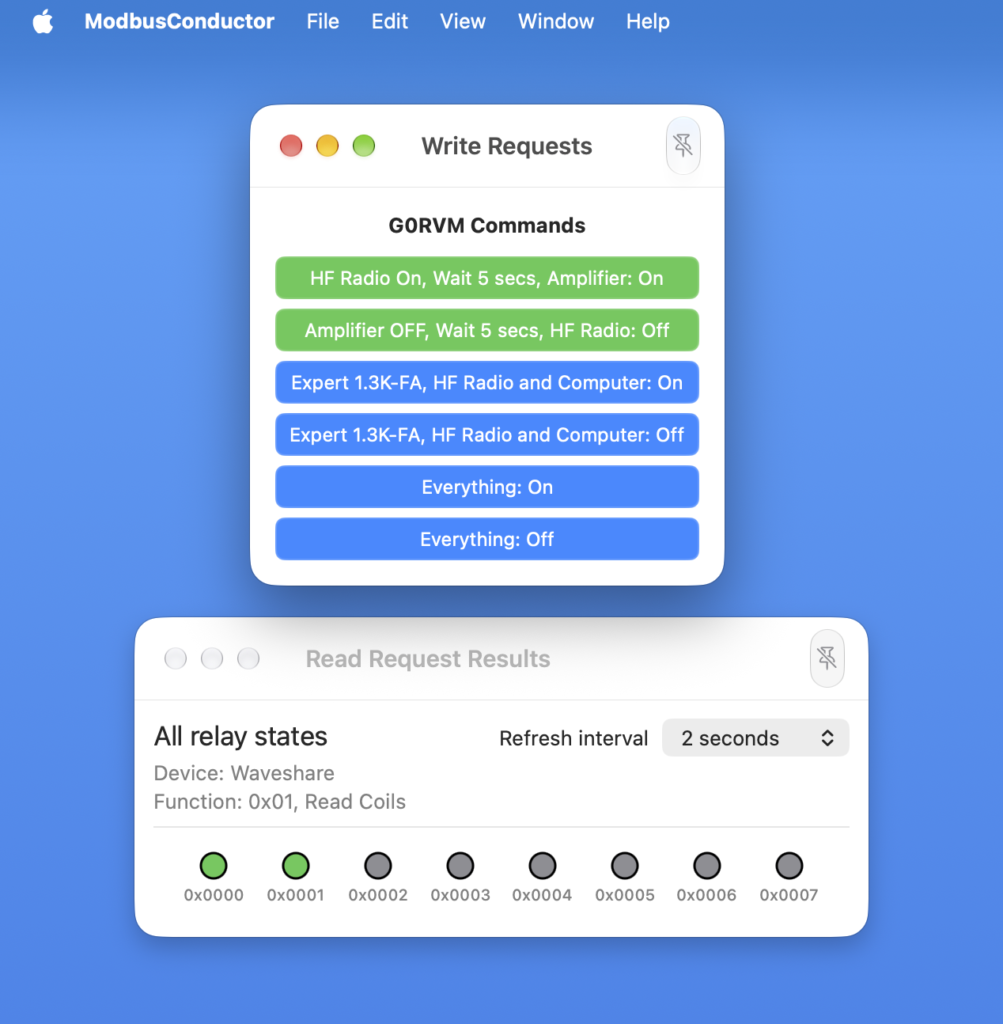
The image below presents an example of Modbus Conductor in use. The button Panel contains two Macro’s (Green) and four Write Requests (Blue). Each button label may be defined to give a user-friendly description of its action. The second window illustrates the current On/Off state of the eight relays supported by the Modbus Server and is set to refresh automatically every two seconds. Both windows may be set to ‘float’ above other windows on the desktop using the pin icon in right-side of the title-bar.
Requirements
- A Mac using macOS 15 or later
- A Modbus TCP capable device.
Supported Modbus devices:
Modbus Conductor is a generic Modbus TCP application not tied to any single brand or device model. It has been designed to be compliant with version 1.1b3 of the Modbus Application Protocol Specification. This specification was issued in April 2012, has been stable for many years and thus has wide adoption by Modbus TCP aware devices.
Download
Modbus Conductor will soon be available from the Apple App Store in most countries by searching for “Modbus Conductor”. I will post an update to this site when it becomes available. Additionally, the latest development/test build with a time locked (30 day) evaluation period is available now using the button below.